> For the complete documentation index, see [llms.txt](https://docs.tellor.io/tellor/llms.txt). Markdown versions of documentation pages are available by appending `.md` to page URLs; this page is available as [Markdown](https://docs.tellor.io/tellor/running-palmito-testnet/node-quick-start-testnet.md).
# Node Quick Start (testnet)
Use the guided setup shell scripts!
#### 1. Install Prerequisites:
```shellscript
# Debian / Ubuntu:
sudo apt install jq sed curl wget
# Arch (btw):
sudo pacman -S jq sed curl wget
# MACOS:
brew install jq sed curl wget
```
Download the latest binary:
{% tabs %}
{% tab title="Linux" %}
mkdir -p ~/layer/binaries && cd ~/layer/binaries && mkdir v6.1.8 && cd v6.1.8 && wget https://github.com/tellor-io/layer/releases/download/v6.1.8/layer_Linux_x86_64.tar.gz && tar -xvzf layer_Linux_x86_64.tar.gz
{% endtab %}
{% tab title="MacOS" %}
{% code overflow="wrap" %}
```sh
mkdir -p ~/layer/binaries && cd ~/layer/binaries && mkdir v6.1.8 && cd v6.1.8 && wget https://github.com/tellor-io/layer/releases/download/v6.1.8/layer_Darwin_arm64.tar.gz && tar -xvzf layer_Darwin_arm64.tar.gz
```
{% endcode %}
{% endtab %}
{% tab title="Rasp.Pi / ARM64" %}
{% code overflow="wrap" %}
```shellscript
mkdir -p ~/layer/binaries && cd ~/layer/binaries && mkdir v6.1.8 && cd v6.1.8 && wget https://github.com/tellor-io/layer/releases/download/v6.1.8/layer_Linux_arm64.tar.gz && tar -xvzf layer_Linux_arm64.tar.gz
```
{% endcode %}
{% endtab %}
{% endtabs %}
### 2. Download the script that matches your system:
Additional info about the scripts can be found [here](https://github.com/tellor-io/layer/tree/main/scripts/setup). We will give the script permission to execute in the same command.
{% tabs %}
{% tab title="Linux" %}
{% code overflow="wrap" %}
```sh
curl -O https://raw.githubusercontent.com/tellor-io/layer/refs/heads/main/scripts/setup/initial_config/configure_palmito_linux.sh && chmod +x configure_palmito_linux.sh
```
{% endcode %}
{% endtab %}
{% tab title="Mac" %}
{% code overflow="wrap" %}
```sh
curl -O https://raw.githubusercontent.com/tellor-io/layer/refs/heads/main/scripts/setup/initial_config/configure_palmito_mac.sh && chmod +x configure_palmito_mac.sh
```
{% endcode %}
{% endtab %}
{% endtabs %}
### 2.1 (optional) Edit the environment variables
If you'd like to use a custom home directory, custom peers or RPCs you can configure those at the top of the script. The defaults are:
```sh
# ...
export LAYER_NODE_URL=https://node-palmito.tellorlayer.com/rpc/
export RPC_NODE_ID=ac7c10dc3de67c4394271c564671eeed4ac6f0e0
export KEYRING_BACKEND="test"
export PEERS="8d19cdf430e491d6d6106863c4c466b75a17088a@54.153.125.203:26656,c7b175a5bafb35176cdcba3027e764a0dbd0811c@34.219.95.82:26656,05105e8bb28e8c5ace1cecacefb8d4efb0338ec6@18.218.114.74:26656,705f6154c6c6aeb0ba36c8b53639a5daa1b186f6@3.80.39.230:26656,1f6522a346209ee99ecb4d3e897d9d97633ae146@3.101.138.30:26656"
export LAYER_HOME="/home/$(logname)/.layer"
export STATE_SYNC_RPC="https://node-palmito.tellorlayer.com/rpc/"
export KEY_NAME="test"
# ...
```
Use your favorite text editor to change these before running the script if desired.
```sh
nano configure_palmito_linux.sh # if linux
# --or--
nano configure_palmito_mac.sh # if mac
```
### 3. Give the script permission to execute, and run it:
./configure_palmito_linux.sh # if linux
# --or--
./configure_palmito_mac.sh # if mac
The script should greet you and begin the guided setup!
### Options:
* **Snapshot sync**: Download a snapshot from a server, extract it into your data folder, and start the node. The node will need time to catch up downloading blocks. At the time of writing this takes about 6 hours to complete.
* **State sync**: Sync up to the network using snapshots from peers and a good RPC. At the time of writing this takes 12-24 hours to finish.
{% tabs %}
{% tab title="Snapshot Sync" %}
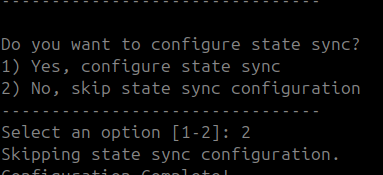
* ***If you want to sync from a snapshot, be sure to select option 2 when asked if you want to set up a state sync, and option 2 again when asked if you want to start the node:***
* Visit [http://layer-node.com](https://layer-node.com/) and use the example commands shown there to download and extract the latest snapshot.
* Move the chain data into your \~/.layer folder:
{% code overflow="wrap" %}
```sh
#
mv -f .layer_snapshot/data/application.db ~/.layer/data/application.db
mv -f .layer_snapshot/data/blockstore.db ~/.layer/data/blockstore.db
mv -f .layer_snapshot/data/cs.wal ~/.layer/data/cs.wal
mv -f .layer_snapshot/data/evidence.db ~/.layer/data/evidence.db
mv -f .layer_snapshot/data/snapshots ~/.layer/data/snapshots
mv -f .layer_snapshot/data/state.db ~/.layer/data/state.db
mv -f .layer_snapshot/data/tx_index.db ~/.layer/data/tx_index.db
rm -rf .layer_snapshot/
```
{% endcode %}
* Start the node!
{% code overflow="wrap" %}
```sh
./layerd start --home ~/.layer --keyring-backend test --key-name KEYNAME --api.enable --api.swagger
```
{% endcode %}
{% endtab %}
{% tab title="State sync" %}
* ***To perform a state sync, simply choose option 1 when prompted, and option 1 again when asked if you want to start the node:***
* Start the node!
{% code overflow="wrap" %}
```sh
./layerd start --home ~/.layer --keyring-backend test --key-name KEYNAME --api.enable --api.swagger
```
{% endcode %}
{% endtab %}
{% endtabs %}